I built a Serbian keyboard that knows “ja ide” is wrong
A Serbian keyboard for iPhone with Latin, Cyrillic and grammar checking, where your text never leaves the phone. Plus Librum Gram for Safari.

You know the feeling when you send a message and only then notice “sta” instead of “šta”? Or when you want to type in Cyrillic and start digging through settings for the right keyboard? I had enough of it. 😅 That is why, starting today, iPhone has the Librum Serbian keyboard, and next to it Librum Gram for Safari.
Both are free. The keyboard is already in the App Store, and the Android version is waiting for Google’s approval, so it arrives in a few days.
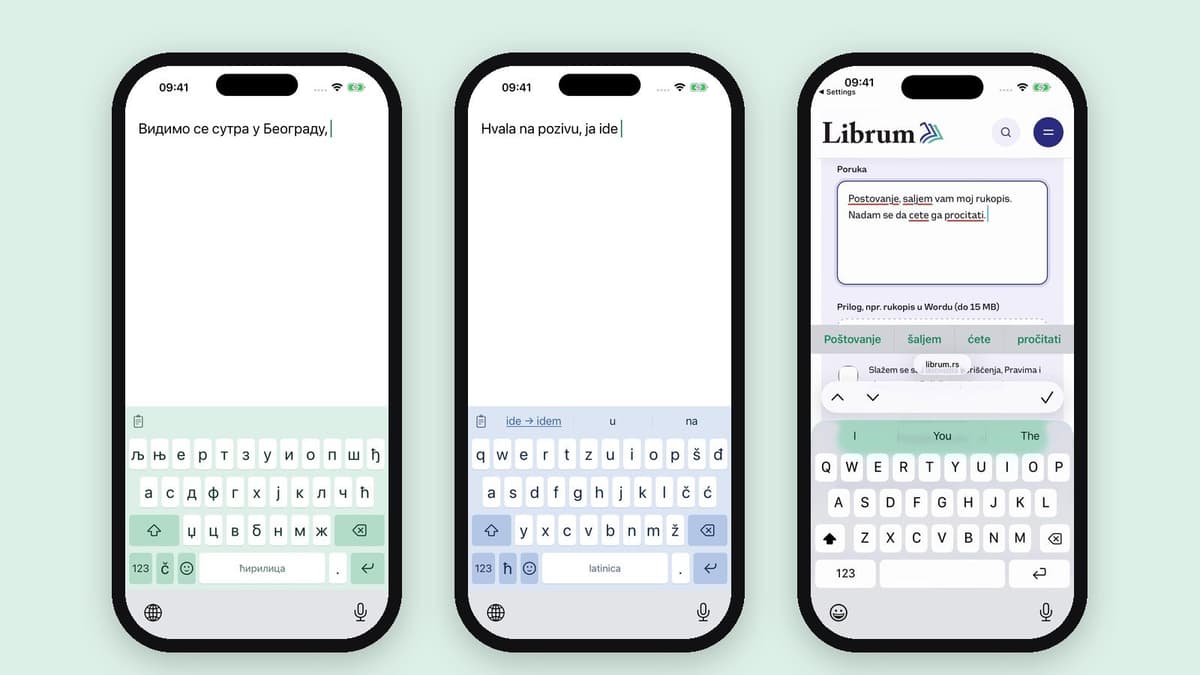
The keyboard in Cyrillic, a Gram correction in Latin and Librum Gram in Safari.
Why another keyboard?
Because none of the ones I tried understands Serbian properly. The built-in keyboard can fix a letter, but it does not know that “ja ide” (“I goes”) is wrong. At Librum we have been building Librum Gram for a while, a spelling and grammar checker for Serbian, and the question was simple: why not have it where we write the most, on the phone?
So the whole Gram engine went into the keyboard. You type “Hvala na pozivu, ja ide”, and a green “ide → idem” appears in the bar above the letters. One tap and it is done. The same goes for gender agreement, a comma before “ali” (“but”) and cases after prepositions. Diacritics are added on their own: “sta” becomes “šta”, “moze” becomes “može”. And if you do not want the correction, one tap on delete brings back what you typed.
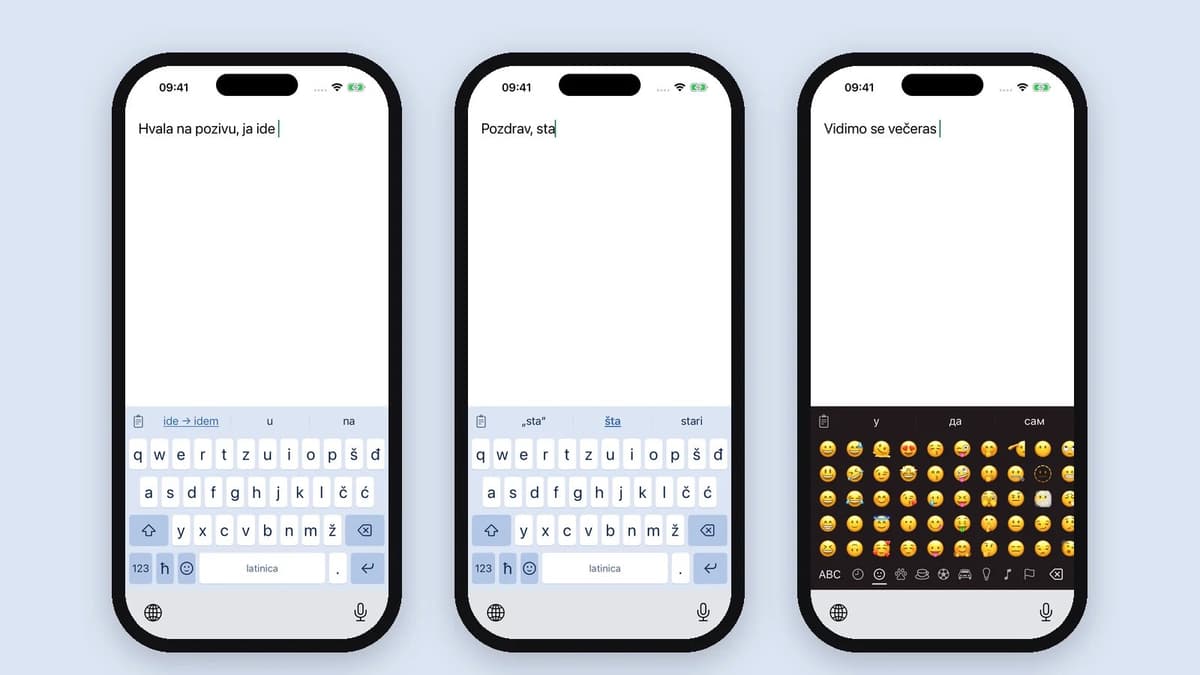
A Gram correction, diacritics and emoji in the dark theme.
Bigger keys, all our letters
The first version felt cramped. I looked at how the best keyboards do it and redid the layout: keys are taller, letters bigger, Đ sits in the first row, and Shift and delete are twice as wide. Č, Ć, Š and Ž have their own keys, no long press needed. Cyrillic has a proper layout with љ, њ and џ, and you switch with one tap. Hold the same key and the text you already typed converts to the other script. That is my personal favourite trick. 🙂
There is also swipe typing, a personal dictionary that remembers your words, a list of the last 20 things you copied, plenty of emoji and themes in the colours of the Librum logo.
What you type stays with you
This mattered most to me. A keyboard sees everything you type, so from day one the rule was: text goes nowhere. All checks run on the phone, even offline. Once a day the app downloads new words for Gram and sends only anonymous numbers, for example how many times someone accepted a suggestion. Not a single sentence. I have no idea what you write, and that is how it should be.
Librum Gram now in Safari too
Until now Gram worked as an extension for Chrome and Edge on the computer. Now you have it on iPhone, in Safari: it underlines mistakes in an email, a comment, a form, on any website. On the phone all corrections line up in the bar above the keyboard, in green, so you just tap them. No pop-ups. Gram needs a free Librum account.
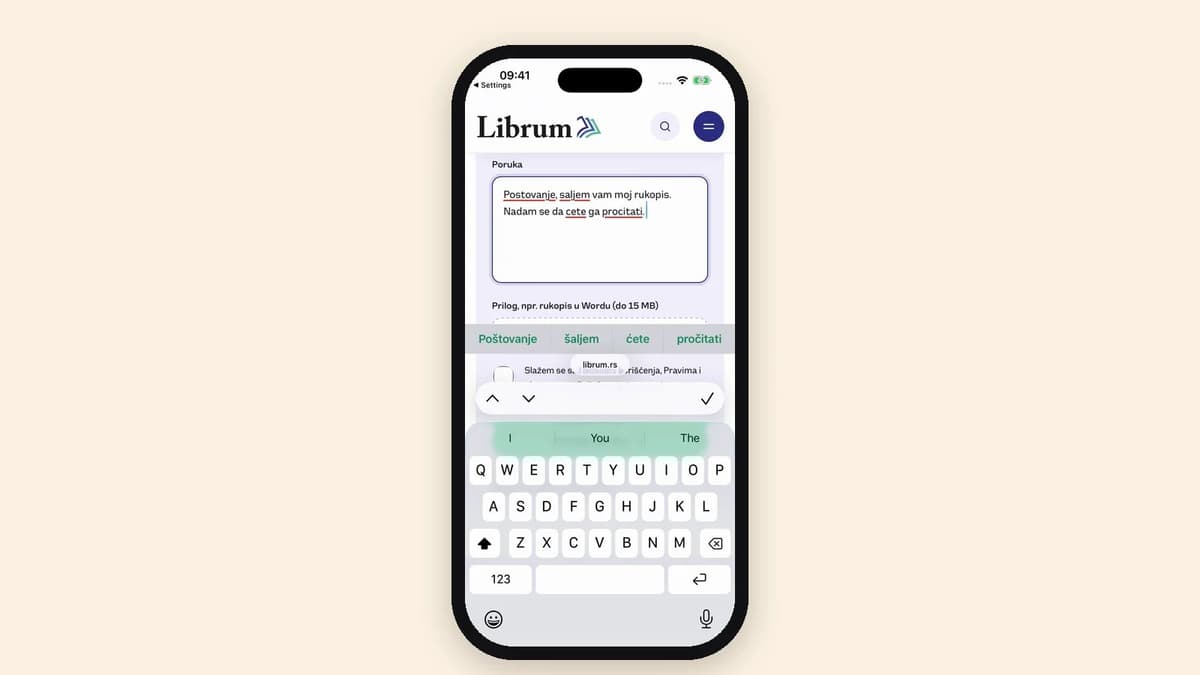
Librum Gram in Safari: mistakes underlined, corrections in the bar above the keyboard.
Try it and let me know
This is only the beginning. The app has a “Report a problem” button and every report comes straight to us. If the keyboard corrects something wrong or does not know a word, tell us and we will extend the dictionary without waiting for a new version.
- Librum Serbian keyboard for iPhone
- Librum Gram for iPhone
- Android version of the keyboard: on Google Play in a few days
The full list of features is in Librum’s announcement (in Serbian). And now I am off to type something in Cyrillic, just because. ✍️
Comments
Loading comments…
Only signed-in readers can comment, to keep bots out. Only your name and photo are shown.
Read next